
Outlook Calendar Organizer Dashboard
Organize tasks, priorities, and schedules to improve personal and team productivity.
The Organizer Dashboard helps teams manage tasks, deadlines, and workloads in one place, enabling better prioritization, reduced missed activities, and more efficient day-to-day execution.
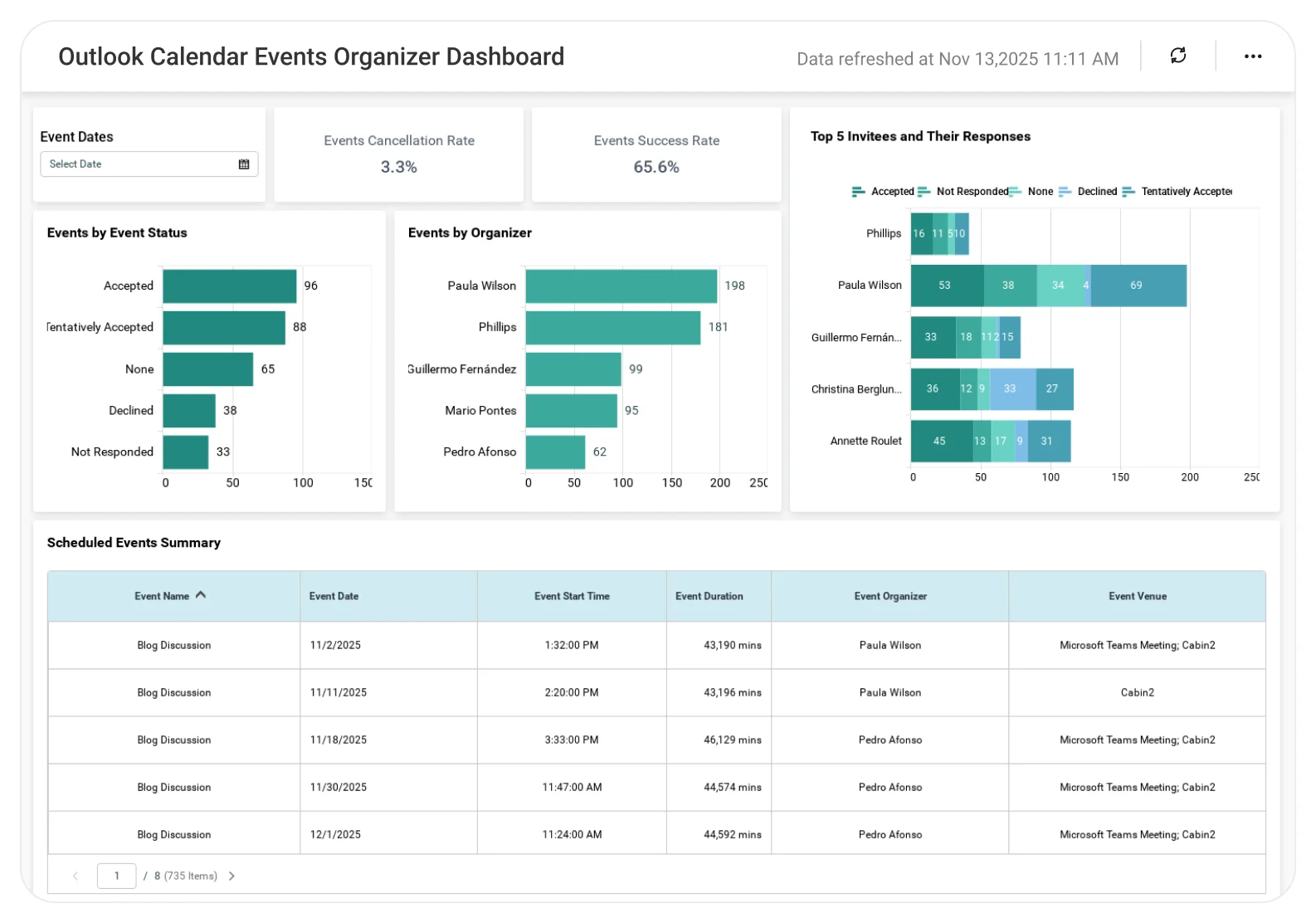
TL;DR
-
Total number of scheduled events.
-
Invitee responses (accepted, declined, tentative, no response).
-
Meetings grouped by organizer.
-
Meeting room usage and demand.
-
Detailed event-level meeting information.
What Is an Outlook Calendar Organizer Dashboard?
An Outlook Calendar Organizer Dashboard visualizes scheduled meetings, attendee responses, and room usage from Outlook calendars.
In Bold BI, this means interactive KPIs, charts, and grids that help teams understand who is organizing meetings, who is attending, and where meetings take place.
Why Outlook Calendar Organizer Dashboard Matters
Meetings involve more than just time, they involve people, rooms, and coordination.
Without visibility:
-
Meeting attendance is hard to track.
-
Room utilization goes unchecked.
-
Scheduling conflicts increase.
-
Organizers lack accountability.
Bold BI centralizes Outlook calendar data into a single dashboard, helping teams plan meetings efficiently and manage shared rooms more effectively.
What You’ll Track
-
Scheduled events & attendance responses: Track total events along with accepted, declined, tentative, and no-response invitees.
-
Meetings by organizer: Analyze who schedules the most meetings and how events are distributed across organizers.
-
Meeting room utilization: Monitor room usage to reduce conflicts and improve space planning.
-
Event-level meeting details: Review organizer, location, attendees, duration, date, and time for every meeting.
All dashboards are fully customizable so you can add KPIs or metrics as needed.
How It Works
-
Connect Outlook calendar data.
-
Apply the Outlook Calendar Organizer Dashboard sample.
-
Analyze meetings using KPIs, charts, and grids.
-
Filter data using preset or custom date ranges.
-
Share dashboards with teams and managers.
Why Bold BI Is the Right Fit for Outlook Calendar Organizer Analytics
-
Optimized room utilization: Identify high-demand rooms, scheduling gaps, and improve space usage.
-
Optimized room utilization: Identify high-demand rooms, scheduling gaps, and improve space usage.
-
Organizer accountability: Analyze meetings by organizer to understand ownership and coordination patterns.
-
Time-saving insights: Eliminate manual calendar reviews with clear, interactive visuals for planners and managers.
-
Secure & embeddable analytics: Share dashboards securely using Row Level Security(RLS), Single Sign On(SSO), and Role Based Access Control(RBAC), and embed them into IT or productivity portals.
-
Flexible deployment: Deploy dashboards securely in cloud or self-hosted environments.
Compare Options (at a glance)
| Feature | Bold BI | Outlook Calendar | Spreadsheets |
| Meeting & attendee analytics | Yes | Limited | Manual |
| Organizer & room breakdowns | Yes | No | Manual |
| Event-level detail | Yes | Partial | Manual |
| Date range filtering | Yes | Limited | Manual |
| Deployment | Cloud / self-hosted | SaaS only | Local |
Frequently Asked Questions
More Articles About Outlook Calendar Organizer Dashboard
-
Unlock the Power of Your Outlook Calendar Data with BI
 Blog post detailing how Bold BI transforms calendar data into actionable insights for time management and collaboration.


